Merge Excel files into one clean workbook.
Merge Excel files when several workbooks need to become one clean file. Upload XLSX, CSV, PDFs, screenshots, or pasted rows, then tell Messy2Sheet whether you want one sheet, separate tabs, a summary, or matched columns.
Upload Excel, CSV, screenshots, PDFs, or paste rows. The merge instructions are already filled in.
Sample files to merged workbook
Three regional order sheets with different headers are merged into one workbook with source tracking and a summary tab.
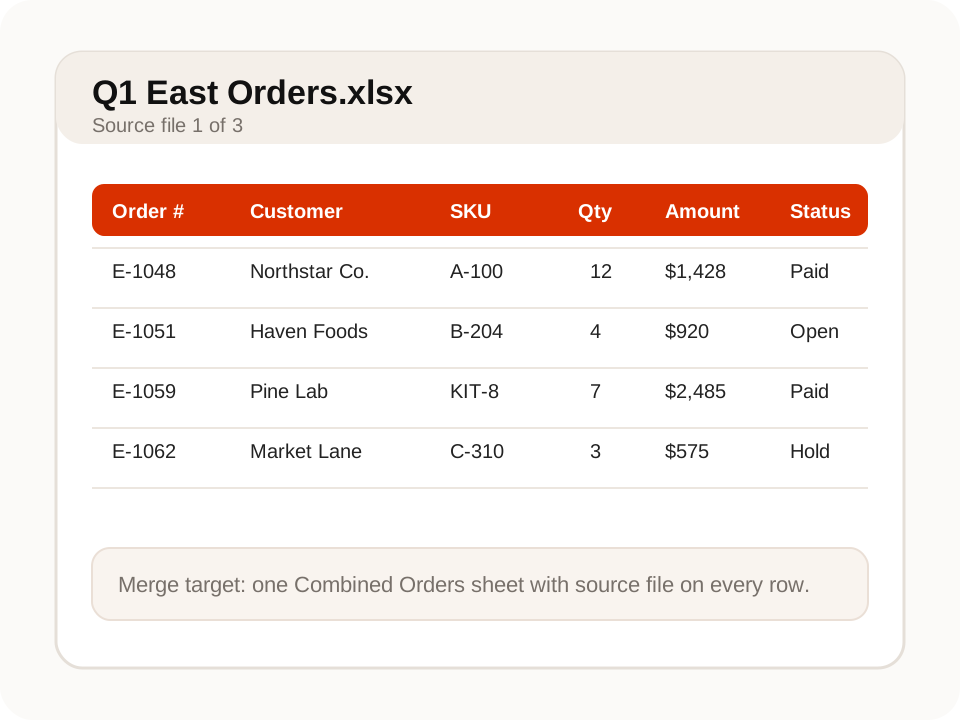
What a useful Excel merge needs.
Merging files is usually not just stacking rows. The useful version keeps source context, fixes mismatched columns, and creates a workbook you can review.
Choose one sheet, one workbook, or separate tabs
Ask for one combined sheet when every file has similar rows, or keep separate tabs when each source needs its own review trail.
Line up columns that do not match perfectly
Files rarely use the same column names. Messy2Sheet can map customer, SKU, amount, date, source file, and notes into the columns you ask for.
Keep source context after the merge
Add checks such as duplicate rows, missing totals, source filename, or summary totals so the merged workbook is easier to trust.
Use it when the file is messy, not unreadable.
Messy2Sheet is built for awkward business documents. If important text is missing, blocked, or too blurry to read, keep a quick manual review in the loop.
Works best with
- Several Excel or CSV files that need one reviewable output.
- Files with similar rows but inconsistent column names.
- Batches where source file, source tab, or source region matters.
- Recurring weekly or monthly merges that can become a workflow.
Needs a manual check when
- Files use completely unrelated schemas and need different outputs.
- Important source tabs are hidden, protected, or missing.
- Duplicate rules are ambiguous and need a human decision.
- The requested output needs external systems that were not uploaded.
Start with a template. Save what works.
For repeated file batches, define the final workbook once, then save the mapping and checks as a workflow.
Merged workbook layout
Use a table template when the merged file needs the same columns every time.
Saved merge workflow
Save the rules that map columns, keep source context, and create the same summary for the next batch.
- 01Map different header names into one final schema.
- 02Keep source file and source tab on every output row.
- 03Add duplicate checks and summary totals before export.
From several files to one reviewable workbook.
Bring files together
Upload several spreadsheets or mixed files and choose whether the result should be one sheet or one workbook.
Fix columns while merging
Map messy headers into the final columns you actually need, instead of cleaning each file by hand.
Save repeat merges
Turn a repeated monthly or weekly merge into a workflow with the same columns and checks.
More ways to turn documents into Excel.
If this is not the file on your desk today, start with a nearby workflow and adjust the columns before running it.
Bank statement converter
For bank pages, statements, deposits, withdrawals, balances, and fee sections.
ConvertInvoice automation
For invoice headers, supplier fields, taxes, totals, and itemized line rows.
AutomatePurchase order automation
For PO packets, quote options, approvals, shipping terms, freight, and totals.
ProcessPDF to CSV converter
For PDF tables, scans, screenshots, price lists, reports, and custom CSV columns.
ConvertExcel formula generator
For creating formulas, checks, totals, lookups, and workbook calculations from plain English.
GenerateQuestions before you upload?
Can I merge multiple Excel files into one sheet?+
Yes. Upload the files and ask for one combined sheet. You can also keep the source filename, source tab, or row notes in the output.
Can it combine CSV and Excel files together?+
Yes. You can upload CSV and XLSX files in the same run and ask for a single workbook or a cleaned CSV output.
What if the files have different columns?+
Describe the columns you want in the final file. Messy2Sheet can map similar fields, leave blanks where data is missing, and add notes for uncertain rows.
Can it remove duplicates while merging?+
Yes. Ask for duplicate checks based on fields such as order number, invoice number, SKU, customer, date, or amount.
Can I reuse the same merge setup?+
Yes. Save the workflow after a good run and reuse the same column mapping and checks for the next batch.
Try it on one real file.
Upload the document, keep or edit the template instructions, and check the workbook before you download it.