Excel formula generator for business workbooks.
Use Messy2Sheet as an Excel formula generator when the workbook needs calculations, checks, totals, lookups, or cleanup formulas. Describe the result you want in plain English and get formulas placed in a reviewable workbook.
Upload a workbook or paste rows. The formula instructions are already filled in.
Sample request to formula workbook
A small order table gets formula columns for line total, margin, tax, aging bucket, and duplicate checks.
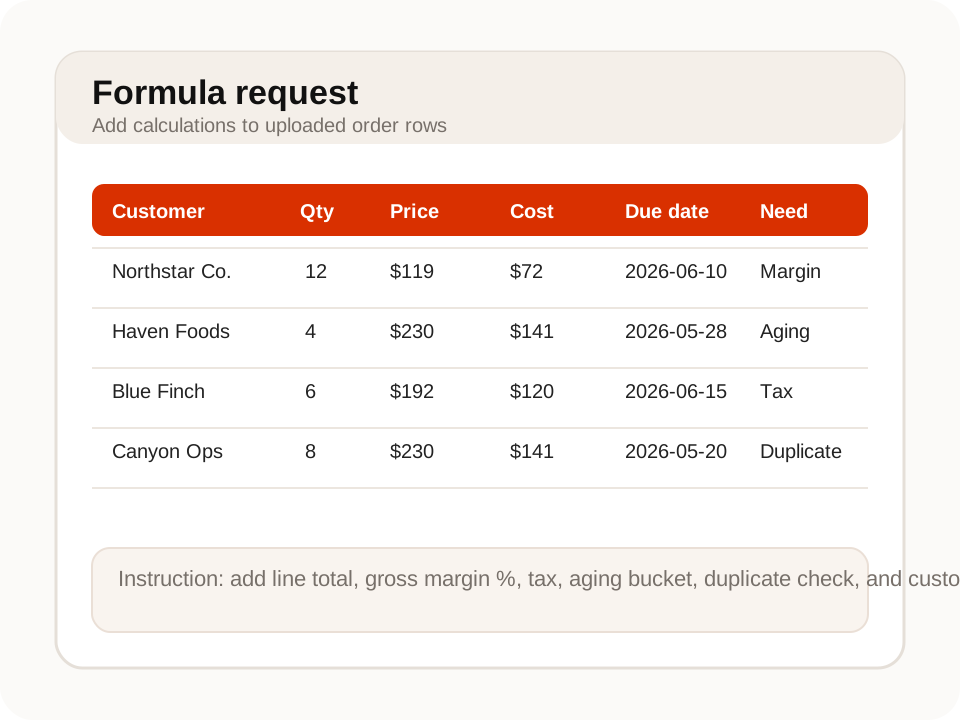
What an Excel formula page should do.
Formula generation is most useful when it is tied to the workbook you are building, not pasted as a standalone answer.
Describe the rule instead of writing the formula first
Ask for formulas by describing the business rule: margin, tax, aging bucket, commission, reorder flag, duplicate check, or anything else your sheet needs.
Put formulas where the workbook needs them
Formulas can be added beside extracted rows, grouped summary tabs, or template columns so the output is ready for review.
See the formula and the result together
Use formula columns with notes and example outputs when the calculation needs a quick check before download.
Use it when the file is messy, not unreadable.
Messy2Sheet is built for awkward business documents. If important text is missing, blocked, or too blurry to read, keep a quick manual review in the loop.
Works best with
- Workbooks where you can describe the calculation rule clearly.
- Rows that already have the input columns needed for formulas.
- Repeated reports that need the same formula columns each time.
- Business checks such as totals, margins, taxes, aging, or duplicates.
Needs a manual check when
- The calculation depends on missing data or private rules not provided.
- The formula needs live connections to systems outside the upload.
- Several business rules conflict and need a human decision.
- The output will drive payments or reporting without manual review.
Start with a template. Save what works.
For repeated spreadsheet work, save the formula columns and review checks as a workflow after one correct workbook.
Formula workbook layout
Use a workbook template when formula columns need to land in a fixed place.
Saved formula workflow
Save the calculation rules so the next uploaded workbook gets the same formula columns.
- 01Keep original values beside calculated fields.
- 02Show formula text or notes when the logic needs review.
- 03Create summary tabs for totals, flags, and exceptions.
From plain-English rule to formula-ready workbook.
Formulas in context
Generate formulas beside the rows, columns, and tabs where they will actually be used.
Calculations and checks
Ask for totals, margins, aging buckets, duplicate checks, status flags, or lookup-style formulas.
Reusable workbook rules
Save a workflow when the same formulas should be applied to future files.
More ways to turn documents into Excel.
If this is not the file on your desk today, start with a nearby workflow and adjust the columns before running it.
Bank statement converter
For bank pages, statements, deposits, withdrawals, balances, and fee sections.
ConvertInvoice automation
For invoice headers, supplier fields, taxes, totals, and itemized line rows.
AutomatePurchase order automation
For PO packets, quote options, approvals, shipping terms, freight, and totals.
ProcessPDF to CSV converter
For PDF tables, scans, screenshots, price lists, reports, and custom CSV columns.
ConvertMerge Excel files
For combining Excel or CSV files into one workbook, one sheet, or separate tabs.
MergeQuestions before you upload?
Can it generate Excel formulas from plain English?+
Yes. Describe the calculation you need, such as margin, tax, aging, lookup, duplicate check, or summary total.
Can it add formulas to an uploaded workbook?+
Yes. Upload the workbook or source files and ask where the formula columns should go.
Can it create formulas for cleaned or extracted data?+
Yes. You can extract messy data first, then ask for formulas, totals, checks, or summary tabs in the same output workbook.
Can I ask for multiple formulas at once?+
Yes. You can ask for several columns, such as margin, tax, status, aging bucket, and validation notes.
Should I still review the formulas?+
Yes. Preview the workbook and check the formula logic before using it in a live business process.
Try it on one real file.
Upload the document, keep or edit the template instructions, and check the workbook before you download it.