Purchase order automation for PO packets and quote lines.
Purchase order automation for PO packets, quote pages, scans, and screenshots. Messy2Sheet pulls buyer, vendor, shipping terms, approvals, line items, freight, and totals into Excel.
Upload a PO packet or paste quote text. The purchase order columns are already filled in.
Sample PO packet to workbook
A public multi-page PO packet with vendor and buyer details, agreement notes, quote options, line prices, freight, and totals.
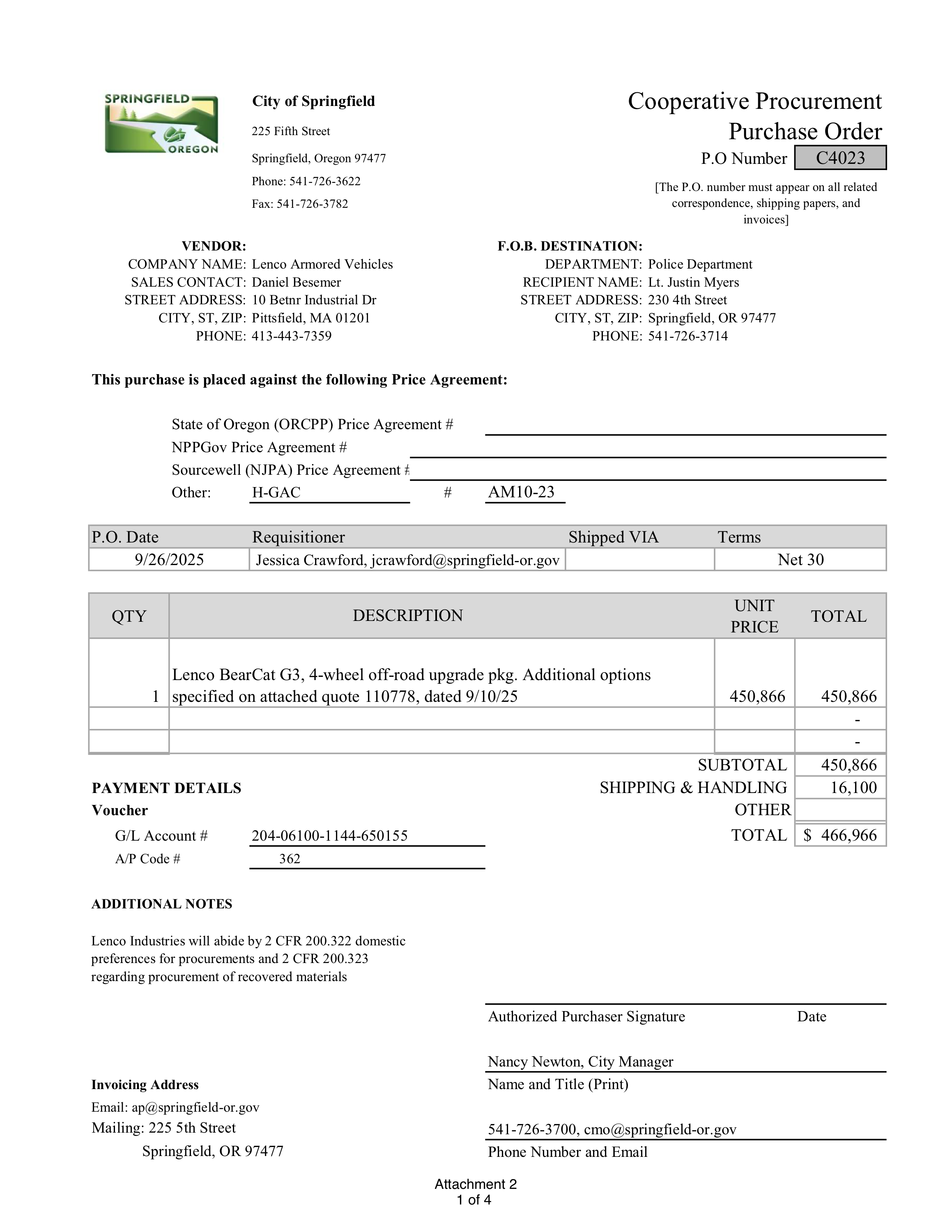
What a PO packet needs after extraction.
Purchase orders often arrive as packets, not one clean table. The workbook needs to separate cover fields from quote lines without losing terms or totals.
Separate the header from the quote rows
Buyer, vendor, PO number, quote number, order date, payment terms, shipping terms, and approval notes can be kept as a separate summary sheet.
Keep dense option lists in order
Configuration lines, option names, product numbers, quantities, unit prices, and line totals are easier to review when they are ordered like the quote.
Keep the math and review notes together
Freight, subtotals, net totals, agreement notes, and unclear fields can stay visible so procurement review does not depend on rereading every page.
Use it when the file is messy, not unreadable.
Messy2Sheet is built for awkward business documents. If important text is missing, blocked, or too blurry to read, keep a quick manual review in the loop.
Works best with
- Multi-page PO packets where all pages are included.
- Visible buyer, vendor, terms, approvals, and quote lines.
- Quote pages with option rows, product numbers, prices, freight, and totals.
- Repeat vendor or agency formats that can become a saved workflow.
Needs a manual check when
- The cover page and quote attachment do not clearly match.
- A terms page, approval page, or quote page is missing.
- Option rows wrap across pages or totals are handwritten.
- Scans are skewed, low contrast, or blocked by stamps and signatures.
Start with a template. Save what works.
For PO packets, use a template that separates cover fields from quote rows, then save the workflow for similar vendors or agencies.
Purchase order output layout
Keep the packet readable by splitting summary fields, quote rows, and review notes.
Saved PO packet workflow
Save the rules that tie pages together and keep dense quote options in order.
- 01Match cover pages, terms, and quote attachments to one PO.
- 02Separate PO summary fields from quote option rows.
- 03Flag missing pages, handwritten totals, or unmatched attachments.
From PO packet to summary and line-item sheets.
PO headers and quote lines
Buyer, vendor, shipping terms, approval notes, quote rows, freight, and totals can be split into useful sheets.
Built for packets
Upload the cover page, terms, and attached quote pages together instead of copying each page by hand.
Review before it leaves
Open the source pages next to the workbook and check the extracted rows before export.
More ways to turn documents into Excel.
If this is not the file on your desk today, start with a nearby workflow and adjust the columns before running it.
Bank statement converter
For bank pages, statements, deposits, withdrawals, balances, and fee sections.
ConvertInvoice automation
For invoice headers, supplier fields, taxes, totals, and itemized line rows.
AutomatePDF to CSV converter
For PDF tables, scans, screenshots, price lists, reports, and custom CSV columns.
ConvertMerge Excel files
For combining Excel or CSV files into one workbook, one sheet, or separate tabs.
MergeExcel formula generator
For creating formulas, checks, totals, lookups, and workbook calculations from plain English.
GenerateQuestions before you upload?
What does purchase order automation extract?+
It can extract buyer and vendor fields, PO numbers, quote numbers, shipping terms, payment terms, approvals, item descriptions, product numbers, quantities, prices, freight, subtotals, totals, and notes.
Can it handle multi-page purchase orders?+
Yes. You can upload several pages in one job and ask Messy2Sheet to keep header fields, terms, quote lines, and totals together.
Can it extract quote options?+
Yes. Ask for option descriptions, product numbers, quantities, unit prices, line totals, freight, subtotals, and notes.
Can I use my own PO template?+
Yes. Upload a spreadsheet template if the output needs to match your review or procurement format.
Can I reuse a PO workflow?+
Yes. Save the columns and cleanup rules after one good run, then reuse them for similar purchase orders.
Try it on one real file.
Upload the document, keep or edit the template instructions, and check the workbook before you download it.