Invoice automation that turns files into reviewable Excel rows.
Invoice automation for PDFs, scans, screenshots, and copied invoice text. Messy2Sheet extracts supplier details, invoice numbers, dates, taxes, totals, and line items into a reviewable workbook.
Upload invoices or paste invoice text. The invoice columns are already filled in.
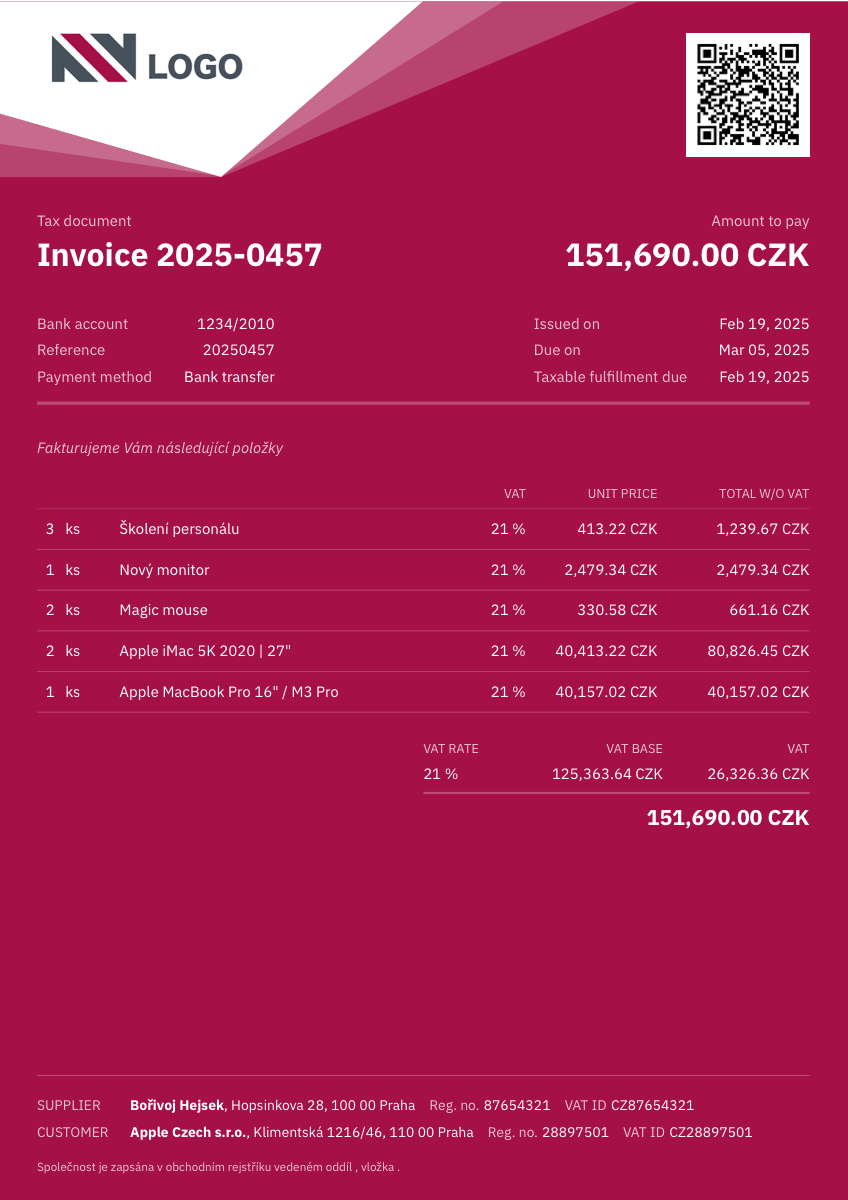
Sample invoice to workbook
A dense VAT invoice with supplier, customer, payment details, item rows, tax rate, tax base, and total due.
What invoice automation should preserve.
Invoice automation works best when the page has both header fields and item rows. The output should make review easier before anything goes into accounting.
Capture the fields people check first
Supplier, customer, invoice number, invoice date, due date, payment terms, currency, and notes can be kept alongside the extracted rows.
Make item rows reviewable, not buried in a PDF
Item descriptions, quantities, unit prices, tax rates, discounts, and line totals are pulled into columns your accounting or ops team can review.
Match the sheet your process already expects
When an import file needs fixed columns, upload a spreadsheet template or describe the exact output layout before starting the run.
Use it when the file is messy, not unreadable.
Messy2Sheet is built for awkward business documents. If important text is missing, blocked, or too blurry to read, keep a quick manual review in the loop.
Works best with
- Clear invoice PDFs, scans, screenshots, or copied invoice text.
- Visible supplier, customer, invoice number, tax, totals, and line items.
- Repeated supplier formats or a spreadsheet template you already use.
- Files where item rows and totals are printed clearly.
Needs a manual check when
- VAT labels, currency, or total due are hard to read.
- Line items are cut off, merged, or continued on another page.
- The invoice uses handwritten corrections or heavy stamps.
- The file combines multiple invoices with different formats.
Start with a template. Save what works.
For repeat suppliers, use a template that mirrors your accounting import, then save the invoice rules after one clean review.
Invoice review layout
Start from the columns your team already checks before payment or import.
Saved supplier invoice workflow
Save supplier-specific instructions so the next invoice starts with the same output shape.
- 01Split invoice header and line items into reviewable sheets.
- 02Keep tax labels, currency, discounts, and totals visible.
- 03Flag mismatched totals or unreadable fields before export.
From invoice file to reviewable accounting rows.
Headers and line items together
Supplier, customer, invoice number, dates, payment terms, tax, totals, and rows can stay in one workbook.
Your columns, not ours
Ask for the fields your team needs for review, bookkeeping, import, or reimbursement.
Templates when format matters
Use a spreadsheet template when invoices need to land in the same columns every time.
More ways to turn documents into Excel.
If this is not the file on your desk today, start with a nearby workflow and adjust the columns before running it.
Bank statement converter
For bank pages, statements, deposits, withdrawals, balances, and fee sections.
ConvertPurchase order automation
For PO packets, quote options, approvals, shipping terms, freight, and totals.
ProcessPDF to CSV converter
For PDF tables, scans, screenshots, price lists, reports, and custom CSV columns.
ConvertMerge Excel files
For combining Excel or CSV files into one workbook, one sheet, or separate tabs.
MergeExcel formula generator
For creating formulas, checks, totals, lookups, and workbook calculations from plain English.
GenerateQuestions before you upload?
What can invoice automation extract?+
It can extract supplier details, customer fields, invoice numbers, dates, payment terms, item descriptions, quantities, unit prices, taxes, discounts, totals, and notes.
Can it extract invoice line items?+
Yes. You can extract item descriptions, quantities, unit prices, taxes, discounts, totals, and notes into separate columns.
Does it work with non-English invoices?+
Yes, if the text is readable. You should still review fields such as tax labels, currency, and item descriptions before using the workbook.
Can I match my accounting template?+
Yes. Describe the columns you need or upload an existing spreadsheet template when the output must follow a specific format.
Can I save invoice rules?+
Yes. Save the setup as a workflow when you process the same supplier or invoice format repeatedly.
Try it on one real file.
Upload the document, keep or edit the template instructions, and check the workbook before you download it.