Bank statement converter for Excel-ready transaction rows.
Use Messy2Sheet as a bank statement converter for PDFs, scans, screenshots, and statement images. It pulls out transactions, balances, fees, and summary fields into an Excel workbook you can check before using.
Upload a bank statement or paste transaction text. The statement columns are already filled in.
Sample statement to workbook
A public sample statement with wrapped descriptions, deposits, withdrawals, running balances, and account fields.
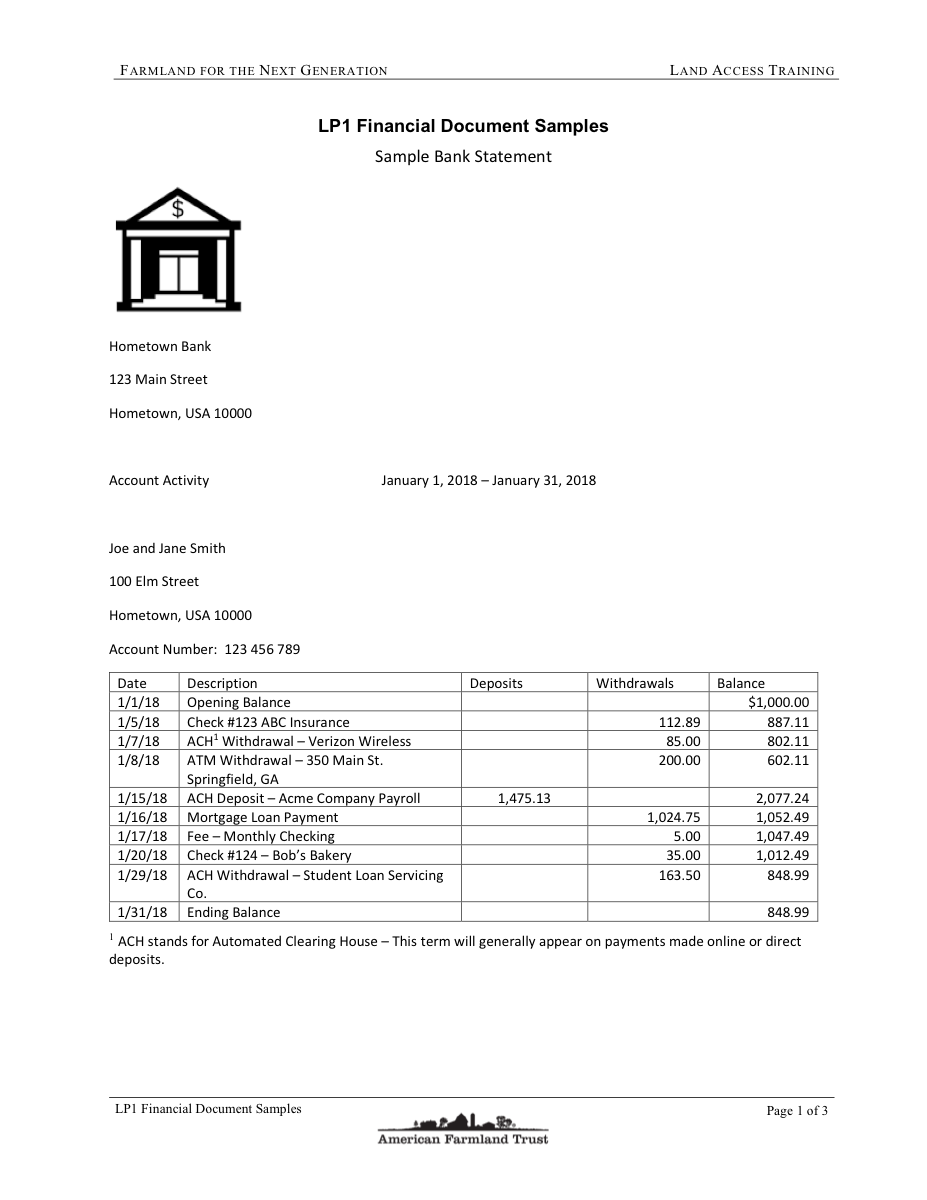
What a bank statement workbook needs to keep.
Bank statements are not just transaction tables. The useful workbook keeps the rows, balances, fees, and summary fields in places you can audit.
Keep statement activity in separate columns
The main sheet is built around dated rows, descriptions, money in, money out, and running balances, so the result can be filtered instead of reread.
Do not throw away the statement context
Opening balance, ending balance, account number, statement period, fees, and daily balance sections can stay in the workbook instead of getting lost in OCR text.
Handle descriptions that span multiple lines
Long transaction descriptions often wrap across printed lines. The workflow is written to keep those descriptions together when the source is readable.
Use it when the file is messy, not unreadable.
Messy2Sheet is built for awkward business documents. If important text is missing, blocked, or too blurry to read, keep a quick manual review in the loop.
Works best with
- Clear PDF statements, scans, screenshots, or statement images.
- Visible transaction dates, descriptions, amounts, and balances.
- Monthly statements from the same bank where the layout repeats.
- Files where you already know the ledger columns you want.
Needs a manual check when
- A page is missing, cropped, tilted, or covered by glare.
- Account numbers or transaction descriptions are masked or cut off.
- Daily balance and summary sections are split across pages.
- The statement mixes handwriting or stamps with printed rows.
Start with a template. Save what works.
For recurring statements, start with a ledger-style template, check one workbook, then save the rules for the next month.
Bank statement workbook layout
Use a workbook shape that matches bookkeeping review before you upload.
Saved monthly statement workflow
Once the first run looks right, keep the same columns and cleanup rules for that bank layout.
- 01Keep wrapped transaction descriptions together.
- 02Separate summary rows from transaction activity.
- 03Flag missing balances or unreadable amounts.
From statement page to ledger-ready workbook.
Transactions stay filterable
Dates, descriptions, deposits, withdrawals, balances, and fees land in separate columns instead of one copied text block.
Summaries are not thrown away
Keep opening balance, ending balance, account fields, service fees, and daily balance sections when they matter.
Use the same rules again
Save a workflow for monthly statements so the next upload starts with the same output shape.
More ways to turn documents into Excel.
If this is not the file on your desk today, start with a nearby workflow and adjust the columns before running it.
Invoice automation
For invoice headers, supplier fields, taxes, totals, and itemized line rows.
AutomatePurchase order automation
For PO packets, quote options, approvals, shipping terms, freight, and totals.
ProcessPDF to CSV converter
For PDF tables, scans, screenshots, price lists, reports, and custom CSV columns.
ConvertMerge Excel files
For combining Excel or CSV files into one workbook, one sheet, or separate tabs.
MergeExcel formula generator
For creating formulas, checks, totals, lookups, and workbook calculations from plain English.
GenerateQuestions before you upload?
What does a bank statement converter extract?+
It can extract transaction dates, descriptions, deposits, withdrawals, balances, fees, account fields, statement periods, and summary rows.
Can it handle scanned bank statements?+
Yes, as long as the text is readable. Clear scans and screenshots usually work better than angled photos or cut-off pages.
Can I choose the transaction columns?+
Yes. You can ask for date, description, money in, money out, balance, account number, category, notes, or any other columns you need.
Does it keep statement summaries?+
Yes. You can keep summaries, fees, opening balances, ending balances, or account details in the same workbook.
Can I reuse the same setup next month?+
Yes. After a run looks right, save the workflow and reuse the same columns and rules for similar statements.
Try it on one real file.
Upload the document, keep or edit the template instructions, and check the workbook before you download it.